Concept eerst
Werk veilig in concept en finaliseer pas wanneer bedragen, regels en klantgegevens kloppen.
Facturen maken
Maak facturen op basis van geboekte uren met 1 klik en voeg andere kosten toe. Verstuur de factuur naar je klant in de taal van je klant met bijlage PDF, UBL en optioneel een Stripe betaallink.
Factureren
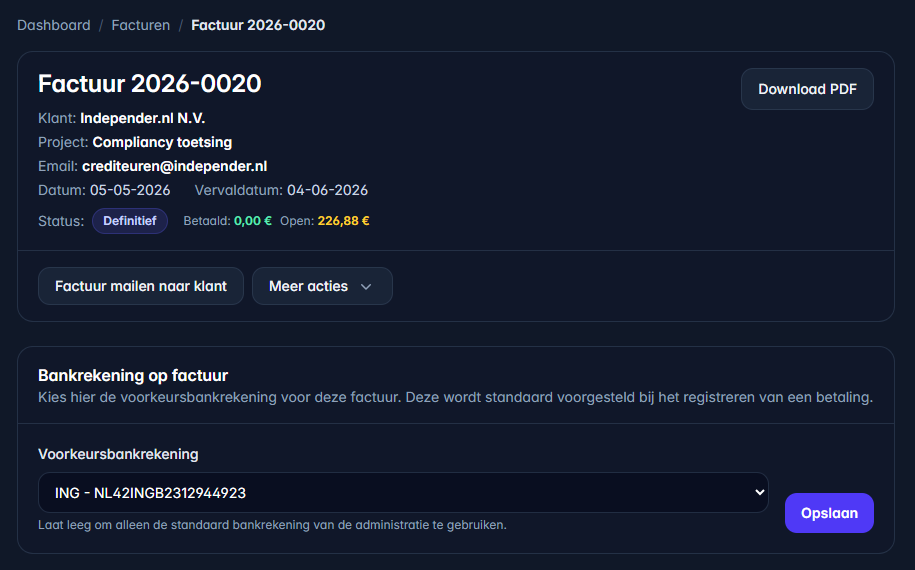
De factuurmodule werkt met concepten, definitieve facturen, verzonden en betaalde statussen. Je kunt btw-scenario’s controleren en facturen crediteren wanneer dat nodig is.
Werk veilig in concept en finaliseer pas wanneer bedragen, regels en klantgegevens kloppen.
Zie of een factuur concept, definitief, verzonden, betaald of gecrediteerd is.
Binnenlandse btw, toepasselijke verlegging, gewone EU B2B en export, met controle van profiel en aftrek. OSS/IOSS en marge zijn uitgesloten.
Koppel Stripe en maak bij definitieve facturen een online betaallink voor snellere betaling.
Gebaseerd op de factuurmodule
De Docs beschrijven concept, definitief, verzonden, betaald en credit. Die statussen maken duidelijk waar een factuur in het proces staat.
UurKlus controleert of factuurregels logisch zijn voor het gekozen btw-scenario, bijvoorbeeld binnenlands hoog/laag, verlegd, EU of export.
Koppel Stripe bij Online betalingen en maak daarna per definitieve factuur een betaallink. Bij een succesvolle betaling kan UurKlus de factuur als betaald verwerken.
Na verzending kun je betalingen registreren of via Stripe laten verwerken. Zo blijft zichtbaar welke facturen nog openstaan.
Wanneer een definitieve factuur gecorrigeerd moet worden, kun je met een creditfactuur netjes administreren.
Werkwijze
Kies de klant en voeg regels toe vanuit uren, een project of handmatig.
Controleer omschrijvingen, aantallen, prijzen en het juiste btw-type.
Maak de factuur definitief zodra alles klopt.
Wanneer Stripe gekoppeld is, kun je een online betaallink maken en meesturen met de factuur.
Houd bij of de factuur verzonden en betaald is, of maak een creditfactuur wanneer nodig.